
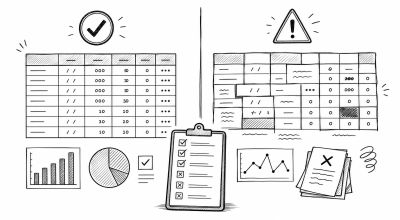
Best practices make spreadsheets easier to trust. Anti-patterns are habits that seem convenient at first, but create errors when the file grows or another person uses it.
This module is the quality-control playbook for the whole spreadsheet tutorial path.
Concept: Build for Future Review
A good spreadsheet should be understandable later.
That means:
- Data has a clear source
- Formulas are consistent
- Assumptions are visible
- Reports can be traced back to raw data
- Someone else can review the logic without guessing
The goal is not perfection. The goal is a spreadsheet that remains useful under real work pressure.
Best Workflow: Raw Data to Report
Use this sequence:
- Import data into
Raw_Data - Preserve the raw source without manual changes
- Clean and validate in
Clean_Data - Build formulas and pivots in
Analysis - Summarize key metrics in
Summary - Present final output in
Dashboard - Share reviewed results with controlled permissions
This workflow keeps input, logic, and presentation separate.
Best Practice 1: Keep One Record Per Row
Each row should represent one complete record.
Examples:
- One transaction
- One task
- One customer
- One inventory movement
Avoid mixing section titles, notes, subtotals, and data rows in the same table.
Best Practice 2: Separate Inputs and Formulas
Inputs should be easy to find. Formulas should be protected or visually separated.
Good structure:
- Input cells: editable
- Formula cells: protected
- Assumption cells: labeled
- Output cells: reviewed
This makes the file safer for collaboration.
Best Practice 3: Use Consistent Formula Patterns
Formula consistency makes errors easier to find.
Check that:
- Similar rows use the same formula pattern
- Ranges cover the intended data
- Absolute references are used for fixed assumptions
- Error handling is intentional
If one formula in a column is different, there should be a clear reason.
Anti-Pattern 1: Hardcoded Values in Formula Cells
Hardcoded values hide logic.
Risky example:
=B2*0.11
Better approach:
=B2*Tax_Rate
Put assumptions in visible cells or named ranges so they can be reviewed.
Anti-Pattern 2: Merged Cells in Data Tables
Merged cells make sorting, filtering, formulas, and pivot tables harder.
Use merged cells only for presentation areas, not raw or clean data tables.
Better alternatives:
- Repeat the category value in each row
- Use formatting for visual grouping
- Use a pivot table for grouped summaries
Anti-Pattern 3: Inconsistent Dates and Categories
Mixed formats break analysis.
Examples:
05/06/26,2026-06-05, andJune 5in the same columnDone,done,DONE, andCompletedas the same status
Standardize formats before building formulas or charts.
Model Audit Checklist
Before publishing or sharing, review:
- Raw data is preserved
- Required fields are complete
- Dates, numbers, and categories are consistent
- Formula ranges cover the correct rows
- Lookup formulas handle missing values
- Pivot totals match source totals
- Dashboard totals match analysis totals
- Assumptions are documented
- Formula cells are protected
- Version or change notes are available
Practice Task
Review an existing spreadsheet and identify:
- One hardcoded assumption
- One inconsistent format
- One formula range that should be checked
- One place where raw data and reporting are mixed
- One improvement to protection or documentation
Then fix the issues and add a short note explaining what changed.
Common Errors
Watch for these:
- Building dashboards directly on raw data
- Mixing manual subtotals inside datasets
- Hiding important assumptions
- Leaving old formulas below the active data range
- Sharing reports before reconciling totals
- Ignoring small inconsistencies because the file is still small
Quick Recap
Strong spreadsheet work is mostly about structure:
- Keep raw, clean, analysis, and dashboard layers separate
- Make assumptions visible
- Avoid merged cells in data tables
- Keep formulas consistent
- Audit before sharing
These habits turn spreadsheets from fragile files into reliable working systems.